
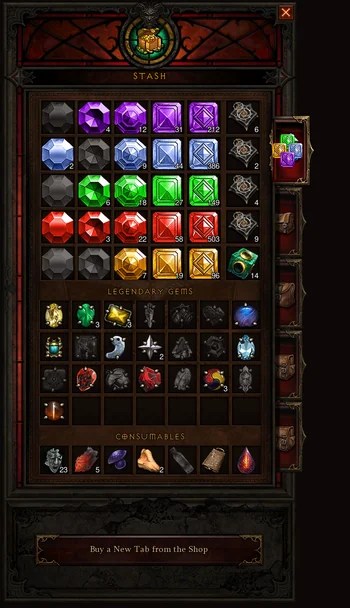
Stash: Gems tab · Content
Stash: Gems tab
The first tab of every stash is the Gems tab: a fixed place for each gem (Marquise to Flawless Royal), the four Infernal Machines, Ramaladni's Gift, the legendary gems and the Staff of Herding and rift consumables, each shown greyed when you have none. With the stash open, right-click one of these items in your backpack and it goes to its own place. Right-click a legendary gem, soul shard place or Whisper of Atonement place that holds more than one to open View Stack: every copy with its rank, to hover, right-click or drag out, and shows where to get the item. 0.3.0 (layout v4) puts the three mining ores on three squares, the four Infernal Machines on one, and gives the Red Soul Shard and each act's soul shards a square. Needs eld3-stash-tabs 1.3.0, eld3-ores and the window framework.
How to get it
- Press Play in the launcher: it installs it by itself.
- Stash: Gems tab
- InstallInstalls itself
- Size334 KB