Content
New monsters and new places for EliteLevelD3. The launcher installs the ones the server uses by itself when you press Play; the others you pick under Mods > Browse. Open one to see what it is and how to get there.
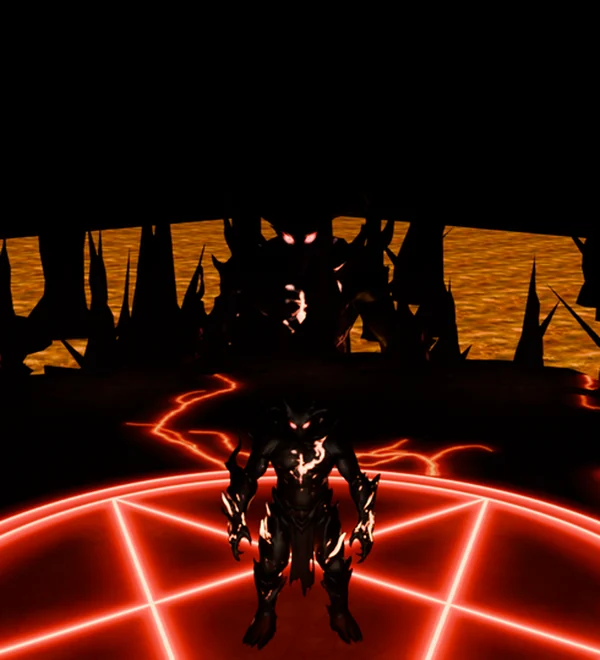
World Boss: Vorgath
A blood-red portal in New Tristram leads to his arena of lava. Bring three friends.
See it In-game alertsIn-game alerts
The server's in-game alerts: toast cards on the right with a coloured bar per kind, the banner at the top, and popups in the game's confirmation box with the server's own words (for example the reason of an update) and one OK button. Includes the exe patch alerts-ui.
See it Altar: real item levelAltar: real item level
With the Altar of Rites seal "Items have no level requirement" every item still says Required Level: 1, and now also shows its real required level in brackets, for example "Required Level: 1 (70)". Items without the seal look exactly as before. Only the tooltip text changes; equipping works as before.
See it Ascension Rift in the obeliskAscension Rift in the obelisk
A third choice in the Nephalem Obelisk dialog: Ascension Rift, in crimson on Black Soulstone art, under Nephalem Rift and Greater Rift. Pick it and press Accept to open an Ascension Rift. The selected tile glows: gold for Nephalem, purple for Greater, crimson for Ascension. Inside it the objective panel, the floor names, the town portal, the close countdown, the results title and the death and error texts read Ascension Rift; Nephalem and Greater Rifts look and work exactly as before.
See it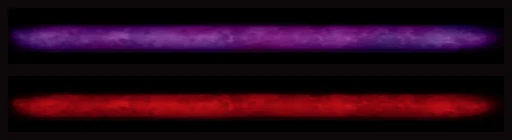
Ascension Rift progress bar (red)
The rift progress bar is red during an Ascension Rift (the server marks it), purple in a Greater Rift and yellow in a Nephalem Rift as before: a red look of the Greater Rift bar model (three new textures) and the exe patch ascension-rift-bar that picks it.
See it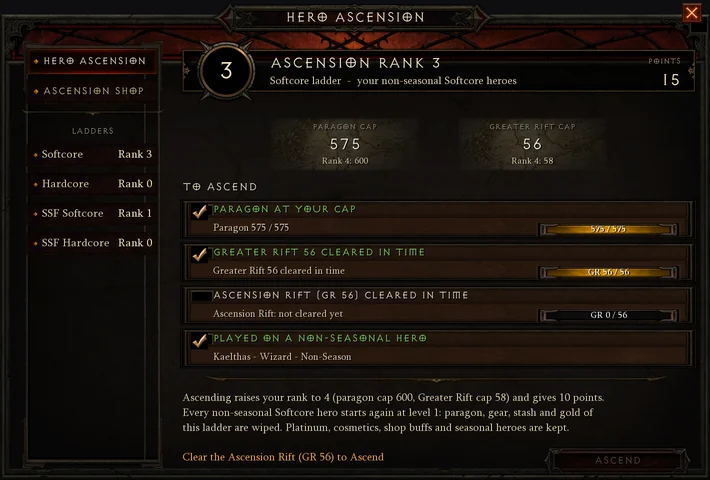
Hero Ascension window
The Hero Ascension window (H): your Ascension rank, caps and what you need to Ascend, the Ascension Shop with Buy and Respec, and the four ladders, in a window of its own made from the game's own art. Press H (or type !ascend) to open it; its buttons do what the !ascend commands do.
See it Community bonus look (preview)Community bonus look (preview)
Community bonus icons with EliteLevelD3 tooltips.
See it Crash guardCrash guard
Keeps the game from closing on the inventory faults that crash players in parties and Greater Rifts: an item or slot the client cannot find is skipped instead of crashing the game, and one line about it goes to the game log for the crash report. Nothing changes in play when the client is not in that state.
See it Crusader: two two-handersCrusader: two two-handers
The Crusader holds a two-handed weapon in each hand with Heavenly Strength: his dual stance (idle, run, walk, both swings, the Twin Judgment whirl, hits and his skills with both blades), retargeted from the game's own dual-wield clips onto his skeleton. The off-hand sword is drawn in his left hand and he swings right, then left. Punish no longer needs a shield.
See it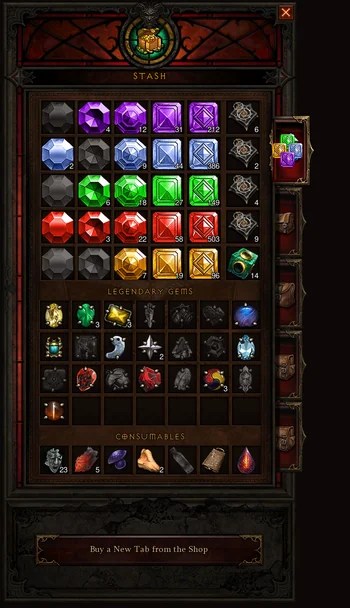
Stash: Gems tab
The first tab of every stash is the Gems tab: a fixed place for each gem (Marquise to Flawless Royal), the four Infernal Machines, Ramaladni's Gift, the legendary gems and the Staff of Herding and rift consumables, each shown greyed when you have none. With the stash open, right-click one of these items in your backpack and it goes to its own place. Right-click a legendary gem, soul shard place or Whisper of Atonement place that holds more than one to open View Stack: every copy with its rank, to hover, right-click or drag out, and shows where to get the item. 0.3.0 (layout v4) puts the three mining ores on three squares, the four Infernal Machines on one, and gives the Red Soul Shard and each act's soul shards a square. Needs eld3-stash-tabs 1.3.0, eld3-ores and the window framework.
See it Greater Rift tiers 151-200Greater Rift tiers 151-200
Greater Rift tiers above 150 for Ascension (up to tier 200): the obelisk shows the empowered cost of tier 151 and higher from the game's last Greater Rift row instead of reading past the end of the table. Tiers 1-150 look and work exactly as before.
See it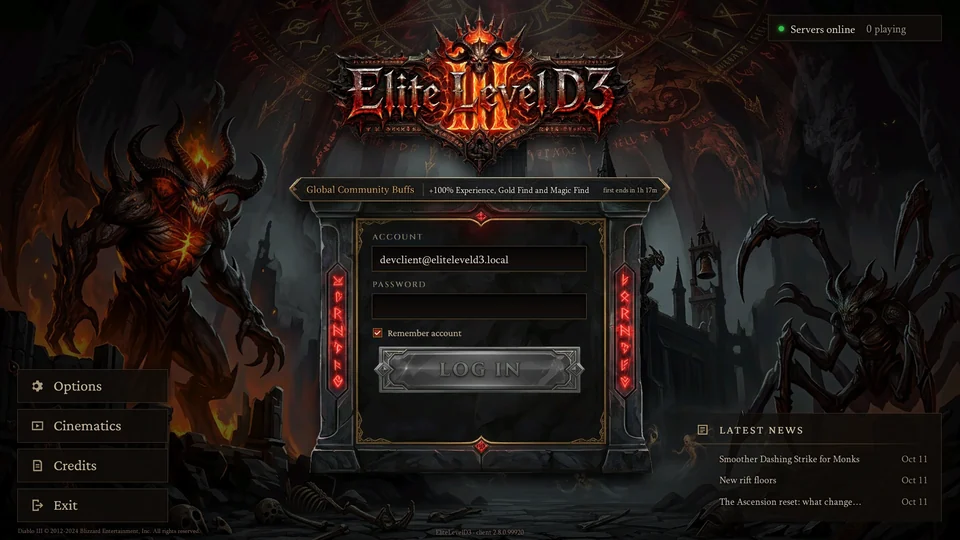
EliteLevelD3 login screen
The EliteLevelD3 login screen: our own wallpaper, logo and stone frame, the community bonus running now with its countdown, how many players are online and the newest patch notes.
See it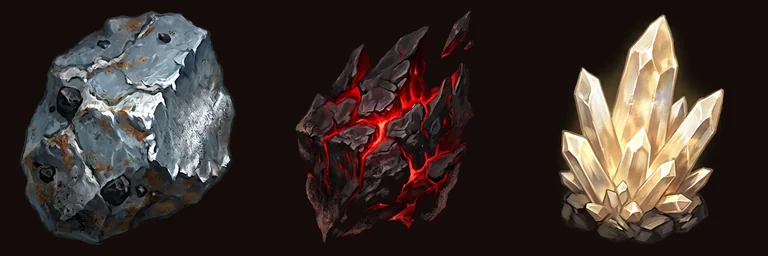
Sanctuary Ores
Leoric's Iron, Caldeum Dread-Iron and Angelic Quartz: the ores mined from ore nodes in Adventure Mode (Torment I and up), for Tashun the Miner's refinery. Their names, icons and tooltips. Required by the EliteLevelD3 server.
See it Legendary Potion sell valueLegendary Potion sell value
The Sell Value line of a Legendary Potion's tooltip shows 25,000,000 gold, what the vendor pays on this server. Every other item and price looks and works exactly as before.
See it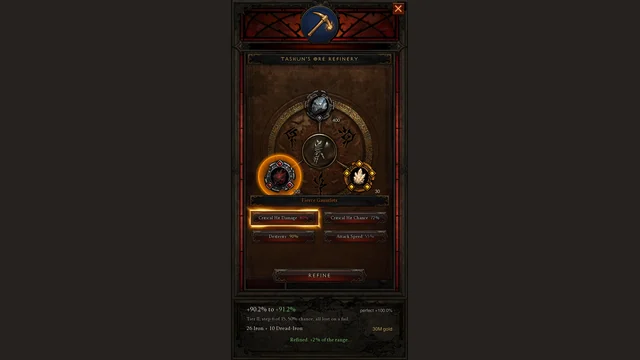
Tashun's Ore Refinery
Tashun the Miner in New Tristram refines your gear with the ore you mine in Adventure Mode: one affix at a time from 50% of its range towards perfect. This mod draws his refinery window: put the item in the centre of the wheel (right click or drag it in).
See it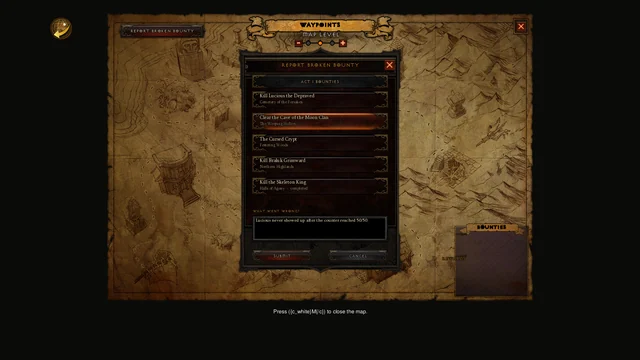
Report Broken Bounty
A Report Broken Bounty button on the adventure map. It opens a window with the bounties of the act the map shows in your game: pick the one that went wrong, say what happened and press Submit. The report goes straight to the EliteLevelD3 bounty fix list. A New Bounties button above the Bounties tracker lets the party leader get a new set for an act that is finished and handed in to Tyrael.
See it Server hostServer host
Points the game at the EliteLevelD3 server by its own name (play.eliteleveldiablo.com) instead of the Windows hosts file, so no administrator rights or hosts edit are needed. Two exe patches that only work together: server-host (the region table and the registry RegionURL override) and sni (the Battle.net connection sends the server name, so the server presents its public certificate).
See it Shop hostShop host
The in-game shop and its sign-in page open at shop.eliteleveldiablo.com instead of the old Battle.net shop names, so Play no longer needs the Windows hosts file or a trusted shop certificate, and the live Diablo III keeps its own shop when both run at the same time. One exe patch: shop-host.
See it
EliteLevelD3 start picture and window title
The picture in the game window while the game starts shows the EliteLevelD3 logo on a fogged-glass panel instead of the stock title picture (1.0.0). Since 1.1.0 the game window's title bar (windowed mode, taskbar, Alt+Tab) reads EliteLevelD3 instead of Diablo III. Changes the ELD3 copy of the game only; settings, screenshots and the Documents folder keep their Diablo III names.
See it Stash: 16 tabsStash: 16 tabs
The stash shows up to 16 tabs, four pages of five, so the stash tabs bought in the Diablo Shop (Enhancements, Stash Tabs) go past 13 and the Gems tab (eld3-gem-stash) fits in front of 15 bought tabs; 10 more grid rows hold the copies the Gems tab's View Stack window shows and 80 more the items of the windows of the window framework (eld3-window-framework). A stash with 13 tabs or fewer looks and works exactly as before.
See it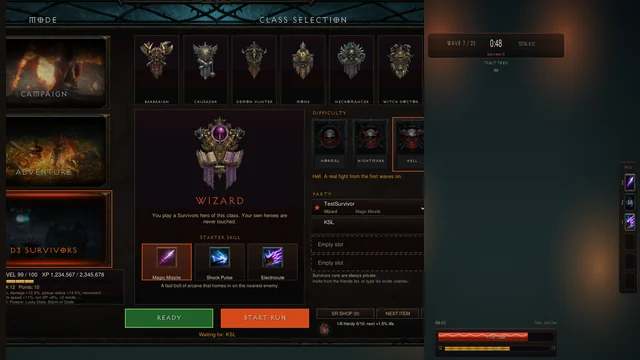
D3 Survivors
D3 Survivors, all of it in one mod: the start panel (class, skill, difficulty, party, Survivor Mirror and Rank Shop), the run HUD, the level-up card window, the D3 SURVIVORS page of the Game Settings screen before you enter a game and the text that says "D3 Survivors" where the game says Challenge Rift. Replaces eld3-survivors-start, -cards, -frontend and -text.
See it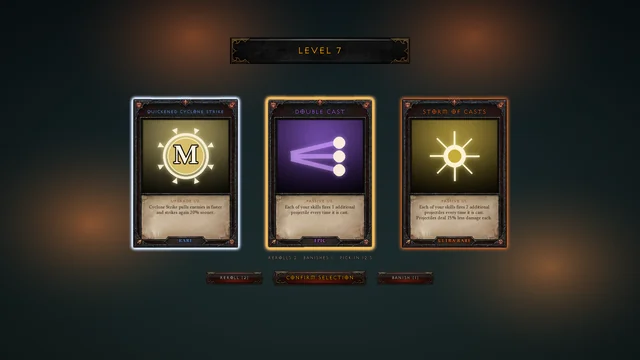
D3 Survivors card window
The level-up card window of D3 Survivors: three cards side by side (frame in the rarity colour, picture, effect text), a glow under the mouse, Reroll, Banish and Confirm. The server opens it at a level-up; without this mod the cards are chosen with !pick 1|2|3 in chat.
See it D3 Survivors front-end Game SettingsD3 Survivors front-end Game Settings
The D3 SURVIVORS page of the Battle.net Game Settings screen (before you enter a game): class tiles, class panel, difficulty, party, READY and START RUN. Layout only for now: class, difficulty and party are still chosen in the hub (obelisk panel) or with !sv.
See it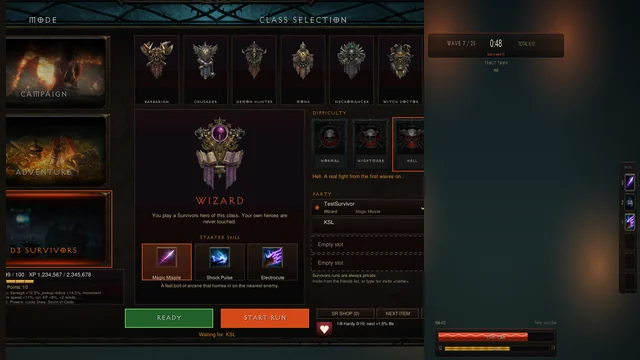
D3 Survivors start panel and run HUD
The start panel and the run HUD of D3 Survivors in the glass theme. Start panel (Challenge Rift obelisk): pick your survivor class with the class crests, one of three starting skills and, as party leader, the difficulty; see the party, invite friends, your Survivor Level and Rank and the SR shop. Run HUD: wave and time, life and XP bars, a skill column with levels and cooldowns. Without this mod the same works with the chat commands !sv and !sl.
See it D3 Survivors textD3 Survivors text
D3 Survivors replaces the Challenge Rift: the game menu button, the Challenge Rift screen, the leaderboard tab, the hub name, the obelisk line, the messages and the quest now say "D3 Survivors".
See it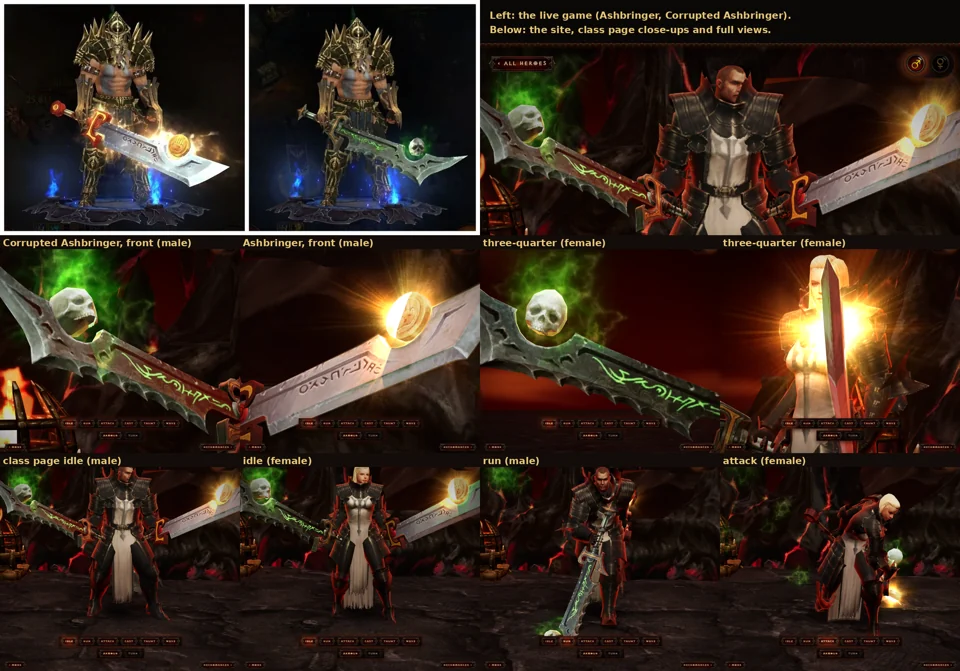
The Twilight Covenant
Ashbringer and Corrupted Ashbringer as two legendary two-handed swords of their own, the two-piece set The Twilight Covenant (Twilight Detonation), their powers, Roland's Legacy rebuilt for two blades and Twin Judgment, with their own gold and green effects and Ashbringer's own icon; Heavenly Strength's tooltip names the second two-hander. The Ring of Royal Grandeur's power says (Emanates): on the follower it counts for your sets. Required by the EliteLevelD3 server.
See it Window frameworkWindow framework
Lets other EliteLevelD3 mods add their own game windows: the server opens and fills them, their buttons talk to the server and their item squares hold real items, moved, dropped and right-clicked like the stash. Changes nothing on its own; needs eld3-stash-tabs 1.3.0 or later.
See it